This article was first published on Medium.
At some point in our careers, most have worked on RAM- and CPU-constrained systems to parse large files, (log, data, or large code files). Most engineers turn to Python for processing these files because of extensive library support and ease of use. In this article, I discuss a Python project where large XML files of varying sizes (sometimes >10 GB) were to be parsed, marshalled, and stored in a PostgreSQL database, and how two simple fixes saved compute costs and my sanity.
Although Python has built-in support for reading XML files through the standard library, I found that implementation slow. Therefore, I chose a wrapper around C’s libxml called lxml for wrangling these large files. If it’s written in C, it ought to be performant. asynpg was used to interface with the Postgres database because of its asynchronous approach to database queries, also very performant.
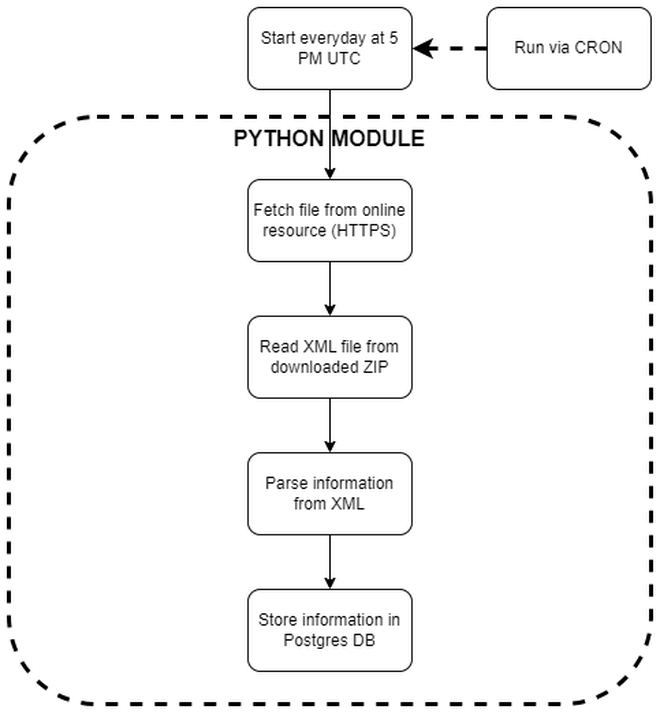
Every day, a new file would be uploaded on the external source depending on the data of the previous day. Therefore, the process would run daily via a cronjob.
XML file layout #
Let’s start by looking at the XML structure, i.e., the problem statement.
XML node names have been obfuscated to protect intellectual property. It is also abridged for brevity.
n3 was the most important node type with relevant information that the project depended on. Depending on the day, there could be only a few thousand n3 nodes in a file or up to a few million. As this data came from an external source, knowing the file size or the n3 node count was impossible.
Nested within n3 were the data gems. For example, the name node in n321 and n331 represented different pieces of information and had their columns in the database. Their parent nodes — n32 and n33 — determined where the
name value would be stored in the database.
<root dtd-version="1.0" date-produced="20131101">
  <n1>DA</n1>
  <n2>
    <date>20250221</date>
  </n2>
  <n3s>
    <n3>
      <n31>
        <n311>64347</n311>
        <n312>1</n312>
        ...
        <!-- more nodes here -->
      </n31>
      <n32>
        <n321>
          <name>Some Name</name>
          ...
          <!-- more nodes here -->
        </n321>
      </n32>
      <n33>
        <n331>
          <name>Some name</name>
          ...
          <!-- more nodes here -->
        </n331>
      </n33>
      <n34>
        <n341>
          <n3411>
            <country>US</country>
            ...
            <!-- more nodes here -->
          </n3411>
          <n3412>
            <country>US</country>
            ...
            <!-- more nodes here -->
          </n3412>
          <n342 lang="en">Some title</n342>
        </n341>
        ...
  <!-- more nodes here as n341 with different information -->
      </n34>
    </n3>
    <n3>
     <!-- data for the next n3 -->
    </n3>
    ...
    <!-- more nodes like n3 -->
</n3s>
First implementation #
Even with the most performant libraries, the first implementation of my parser was inefficient. A classic “you can write bad code in an efficient language” scenario. This code worked well on small files where the file contents fit in RAM. To test this implementation, I had chosen five old files from the external source. To my (later) dismay, these were some of their smallest files that easily fit in RAM when loaded through lxml, giving me a false assurance of robustness. The recent files, however, were large (2-4 GB zipped, 15-18 GB unzipped). After deployment, many “killed” messages started appearing in the logs.
"""
First implementation
"""

import subprocess
import asyncpg
import os
from pathlib import Path
from typing import Any
from lxml import etree
from src.models import N3 # Dataclass

async def connect_db() -> asyncpg.Connection:
    connection = await asyncpg.connect(
        user=POSTGRES_DB_USER,
        password=POSTGRES_DB_PASS,
        database=POSTGRES_DB_NAME,
        host=POSTGRES_DB_HOST,
    )
    return connection


async def add_to_db(db_values: list[Any]):
    connection = await connect_db()
    await connection.copy_records_to_table(
        table_name="table_name", records=db_values, columns=COLUMNS
    )
    await connection.close()


def read_xml_file(filename: str | Path) -> list[N3]:
    n_root = etree.parse(filename)
    n_3s = n_root.getroot().find("n3s")

    list_n3: list[N3] = []
    for n3 in n_3s.findall("n3"):
        n_n31_rec = n3.find("n31")
        n31_rec = create_n31_record(n_n31_rec)

        n_n32_rec = n3.find("n32")
        n32_rec = create_n32_record(n_n32_rec)

        # continue with n33 and n32

        list_n3.append(
            N3(
                n31=n31_rec,
                n32=n32_rec,
                n33=n33_rec,
                n34=n34_rec,
            )
        )

    return list_n3

async def process_one_xml_file(filename: str | Path) -> list[Any]:
    xml_contents = read_xml_file(filename)
    db_values = []
    for xml_content in xml_contents:
        # logic to get relevant information
        db_value = get_relevant_info(xml_content)
        db_values.append(tuple(db_value))

    return db_values

async def process_one_link(link: str):
    filename = os.path.basename(link)
    # Wget the link
    wget = subprocess.run(["wget", "--no-verbose", "--inet4-only", link])

    # Unzip
    unzip = subprocess.run(["unzip", filename, "-d", "xml_doc"])

    # List XML files
    files_in_folder = os.listdir("xml_doc")
    for file in files_in_folder:
        if ".xml" in file.lower():
            db_values = await process_one_xml_file(os.path.join("xml_doc", file))
            if db_values is None:
                continue

            await add_to_db(db_values)

    # Remove everything
    subprocess.run(["rm", filename])
    subprocess.run(["rm", "-Rf", "xml_doc"])
A note about the VM #
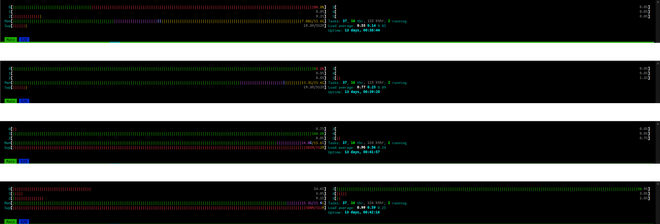
The process ran on a virtual machine provisioned via Linode, with 16 GB RAM and 6 vCPUs. It was enough compute. My naivete, however, rendered this beefy machine inadequate. The first implementation, for larger files, could consume the entirety of RAM and SWAP before the OS killed the process.
For illustration, successive HTOP views for a large file (~1.3 GB in size, ~450,000 n3 nodes) show increasing RAM usage and eventually SWAP usage.
Improved implementation #
Using Python’s zipfile
#
Python has a standard library zipfile that can be used to unzip archives. It was used to replace the unnecessary call to the OS’s unzip utility. Turns out, unzipping via Python did not have a negative RAM impact as I had initially thought.
import zipfile

async def process_one_link(link: str):
    filename = os.path.basename(link)
    # Wget the link
    wget = subprocess.run(["wget", "--no-verbose", "--inet4-only", link])

    with zipfile.ZipFile(filename) as pat_zip:
        files = pat_zip.namelist()
        xml_files = [x for x in files if ".xml" in x.lower()]
        db_values = await process_one_xml_file(xml_files, pat_zip)

    if db_values is None:
        return

    await add_to_db(db_values)
    # ... rest of the function
With this, the process_one_xml_file function changed. What previously was taking one str | Path input now took two arguments: an XML file list from the archive and the archive itself. This function, in the improvement, incorporated zipfile.open to read the XML file as bytes (IO[bytes]) without unzipping.
It removed the step of unzipping the file before parsing and created a micro-efficiency in the process. The performance implications were not enormous, but it reduced reliance on an external utility: a potential point of failure.
async def process_one_xml_file(
    xml_files: list[str], zip_file: zipfile.ZipFile
) -> list[Any]:
  db_values = []
  for xml_file in xml_files:
      with zip_file.open(xml_file) as file:
          xml_contents = read_xml_file(file)

      root_logger.info("Successfully read XML file")
      # ... rest of the function

  return db_values
Using iterparse
#
Event-based XML parsing is superior and more performant than traditional parsing. In traditional parsing, the process loads the entire XML file in RAM to do a findall operation. In event-based parsing, “start” and “end” events of an XML tag are recorded, and only the data of these tags is loaded in memory. One can then go deeper within the tag tree and be assured that only that tag content will be loaded in RAM. Even in complex XML trees, this typically could be a few megabytes, and most modern computers have gigabyte(s) of RAM. Moreover, another remarkable advantage of event-based parsing is that events can be cleared, i.e., data from that tag can be removed to free up memory, which contrasts the traditional approach, which is an all-in/all-out approach.
lxml has iterparse to do event-based parsing. The for loop of the read_xml_function was updated to a iterparse call, replacing the previous findall call. Furthermore, a .clear() call was added to the end of the loop to clear the current n3 node’s data from memory.
def read_xml_file(file_contents: IO[bytes]) -> list[N3]:
    list_n3: list[N3] = []

    for _, n3 in etree.iterparse(
        file_contents, tag="n3", encoding="utf-8", recover=True
    ):
        # rest of the for loop stays the same

    n3.clear()

    return list_n3
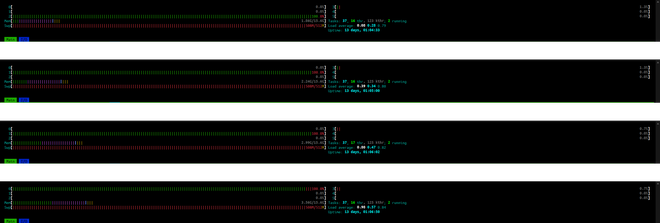
With these changes, the same file (~1.3 GB and ~450,000 n3 nodes) shows steadier and more consistent RAM usage. The slight increase is attributed to the list_n3 being appended to.
Conclusion #
For an XML veteran and a heavy lxml user, these findings may have been obvious. But, for me, it took failures in the pipeline to know and understand the problem. As most VM providers make it easy to add compute, I was eager and tempted to “throw more hardware” at my process to ensure smooth operation. Solutions like these, however, are right under our noses and without the added cost. Even as hardware costs decrease, performance should still be a priority even if it means additional development costs. Developer costs for a specific issue are fixed costs, but additional hardware costs, say through a cloud provider, are variable and cumulative.