Background #
My spouse founded Innocelf in September 2020 to help innovators protect their intellectual property.
As a new company and a single-person team, Innocelf needed a system to manage clients, revenue, track key metrics, and maintain financial documents for taxes while maintaining quality service. There were many viable third-party systems that could perform all these tasks and more, but they came at a high monthly/yearly fee, especially for a fledgling company. Moreover, Innocelf began operations during the COVID-19 pandemic, which brought a host of uncertainties, and the company was not willing to take extreme financial risks.
The pandemic also made remote work normal, and as my spare time expanded, I decided to learn Python for data analysis. While learning the basics, a tutorial mentioned that Python could be used for web development as well. I theorized that if I created a website using Python, I would not only learn it faster and beyond the basics but also help Innocelf create its digital footprint, giving me a glimpse of work beyond automotive.
In this project overview, I go over the process of learning Python and other web-based technologies like JavaScript, HTML, CSS. I also talk about my mistakes and why a partial rewrite was necessary. And it all started with this.
Initial development (2021) #
As a complete novice, I chose Django for this project because internet searches like “python web development” praised it as a “full framework” with “batteries included”; terms I did not know. A couple of long tutorials later, I had a barebones website. These tutorials explained the difference between backend and frontend. In actuality, I had a barebones backend. Frontend required more education with HTML, JavaScript, and CSS.
With time, I learned about Django’s templating capabilities to load dynamic content. I used them to display the {{ title }} and {{ description }} of the page, but I was not yet aware of {% include xxx %} which led to copying and pasting code for various elements (like the nav bar) in various files to maintain consistency. This violated D.R.Y., but JavaScript offered ways to make pages more dynamic and was a “shiny new object” I could play with.
And played around with it, I did. I used it to its “fullest” potential, going completely overboard with its use for achieving “dynamic” behavior. By creating elaborate classes and using extensive inheritance in long JS files (>6000 lines) for the perfect system, I was close to creating a new React—a new JavaScript framework, as if we didn’t have enough of them.
<!DOCTYPE html>
<html lang="en">
	{% extends 'base_ca.html' %}
	{% load static %}

	<head>
		<meta charset="UTF-8">
		<meta name="viewport" content="width=device-width, initial-scale=1.0">
	</head>

	<body class="creative-lp">
		{% block content %}
		<script src="{% static 'js/chart.min.js' %}"></script>

		{% csrf_token %}
		<div id="app"></div>

		<script type="module"
			src="{% static 'ClientAdmin/js/action.js' %}"></script>

		{% endblock content %}
	</body>
</html>
The Django website was divided into two main applications: the website and the dashboard (for tracking projects, revenue, etc.). This is a tree structure of JS files in the website app, clocking in at 9455 lines of code. 1.
.
├── actions_ts.js
├── ComponentClasses
│   ├── AnchorLinks.js
│   ├── CheckboxWithLabel.js
│   ├── ContactUsForm.js
│   ├── DropdownMenu.js
│   ├── DynamicTypedHeading.js
│   ├── FAQ.js
│   ├── FirstPageListItem.js
│   ├── Footer.js
│   ├── HeadingOrParagraph.js
│   ├── Navbar.js
│   ├── OneProcess.js
│   ├── OneProcessGapContainer.js
│   ├── SelectInputWithLabel.js
│   ├── ServiceDescription.js
│   ├── Testimonial.js
│   ├── TextInputCharacterCount.js
│   ├── TextInputWithLabel.js
│   ├── Tooltip.js
│   ├── TwoColumnContainer.js
│   ├── TypicalFormSubmitButton.js
│   ├── TypicalModal.js
│   └── TypicalPostForm.js
├── components_ts.js
├── footer.js
├── render_blog_home.js
├── render_privacy_disclaimer_terms.js
├── render_ts.js
├── renderAboutUs.js
├── renderBlog.js
├── renderFAQ.js
├── renderHomepage.js
├── renderServices.js
├── renderTestimonials.js
└── utils.js

2 directories, 35 files
Similarly, a tree structure of the JS files for the dashboard at 5051 lines.
.
├── _download_invoice.js
├── _generate_invoice.js
├── action.js
├── client_admin_page.js
├── components.js
├── rend_inven_disc_quest.js
└── render.js

1 directory, 7 files
I over-engineered the project into mediocrity. It was brittle, similar to when you load a beam beyond its weight capacity and know it’s going to break, but just not when.
Two years after the website went live, we hired an SEO consultant to expand the website’s reach and grow. He pointed out that rendering everything with JavaScript was hurting SEO because those files are loaded after the HTML. He advised that search robots scan the page at first load and seldom wait for the dynamic content to load. This was hurting Innocelf’s chances to be found via a related term. At the same time, I received new feature requests for the client admin dashboard.
Technical Debt #
To improve SEO performance and develop new features, I revisited the codebase from two years ago and was repulsed by the complexity. It did not help that, as a novice, I had completely disregarded documentation, especially about design decisions. That is a lesson I carry with me to this day: documentation trumps actual code.
JavaScript and its effects on the backend #
The older JavaScript code was highly complex and over-engineered, and its effects showed in the backend design. For example, there were multiple views to retrieve Django forms to render them to the frontend, and corresponding “submit” form views to accept submitted forms. Therefore, for each form, there were two views: one for rendering the form itself, and the other for accepting the submission. Based on how Django uses views and urls, this also added two URLs for the same form. There are easier ways to do this using Django and its templating engine, which I discuss later.
# views.py

def obtain_long_term_client_form(request, *args, **kwargs):
    '''
    The function gathers the long term client form and sends it to the frontend
    via XML request
    '''
    long_term_client_form = LongTermClientForm()
    return HttpResponse(long_term_client_form)
// Corresponding JavaScript

/**
 * The function obtains the long term client form from the backend and renders it nicely in a div
 * @returns Promise with the long term client form
 */
export async function _longTermClientFormRender() {
    let longTermClientForm = new ComponentServices.TypicalPostForm(
        'add-long-term-client-form'
    ).result;

    let formStringData = await RenderServices._obtainForm(
        '/client-admin/obtain-long-term-client-form'
    );
    let form = new DOMParser().parseFromString(formStringData, 'text/html');
    // let csrfToken = document.querySelector('[name="csrfmiddlewaretoken"]');
    let fullName = new ComponentServices.TextInputWithLabel(
        'Name*',
        form.querySelector('[name="client_name"]')
    ).render().result;
    let company = new ComponentServices.TextInputWithLabel(
        'Company*',
        form.querySelector('[name="client_company"]')
    ).render().result;
    let email = new ComponentServices.TextInputWithLabel(
        'Email*',
        form.querySelector('[name="client_email"]')
    ).render().result;
    let submitButton = new ComponentServices.TypicalFormSubmitButton('Submit')
        .result;

    longTermClientForm.append(
        // csrfToken,
        fullName,
        company,
        email,
        submitButton
    );

    submitButton.onclick = function (event) {
        if (longTermClientForm.checkValidity()) {
            event.preventDefault();
            let csrfToken = document.querySelector(
                '[name="csrfmiddlewaretoken"]'
            );
            longTermClientForm.append(csrfToken);
            _longTermClientFormSubmit(longTermClientForm);
        }
    };

    return longTermClientForm;
}
PostgreSQL table names #
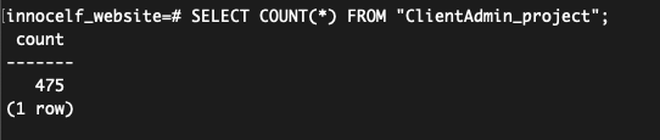
A typical Django project is divided into apps by using the command python manage.py startapp appname. appname is used to create database tables with the appname_modelname format, where modelname represents the entity being stored, payments, for example. Two years ago, I used Pascal casing to startapps. For example, python manage.py startapp ClientAdmin. This created a ClientAdmin_payment PostgreSQL table for the Payment model. It worked without issues through Django, but was inconvenient when accessing tables using Postgres’s command line utility psql. Moreover, not all appnames were in Pascal case, which made the process of using " or not when referencing tables in psql ever more infuriating. See the example below.
The query SELECT COUNT(*) FROM ClientAdmin_project; (without the " around the table name) results in an error, stating clientadmin_project is not a real table, and it’s true.
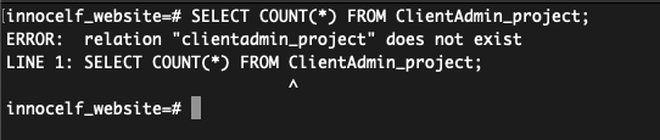
To access tables with capital characters, psql requires that table names be enclosed in ".
Rewrite #
The initial complexity of the project and the tight coupling between the frontend and the backend meant small changes broke entire functionalities. After grappling with this complexity for a few days, I decided to do a rewrite, especially of the frontend, while keeping the backend skeleton intact. This would potentially reduce JavaScript use and, in the process, also help simplify the backend. The rewrite was easier than a refactor, and there were several reasons for that.
A first iteration of the project was completed two years ago, and the goals were clear. This context with a rewrite was a simpler greenfield project, easier to navigate and make progress. The previous context also allowed me to take a system-level approach, which was difficult to do the first time because I was learning language semantics at the same time. It also helped that over the past two years I had built more web projects with FastAPI and Django, which added experience with those frameworks, and I had used Python for my automotive work and was no longer “learning” language semantics; this practice made me more Pythonic. Lastly, I had more time because my company was going through a bankruptcy, and new development was halted till new funding could be obtained.
Landing pages #
Ironically, the landing pages used the most JavaScript but were the simplest to rework. I used the browser’s developer tools to copy the rendered HTML for the production website and paste it into an HTML file (Django template file). I edited these templates slightly to include static files, include nav and footers on all pages, and updated the image URLs to use {% static /image/url %} templating. This reduced JavaScript code complexity significantly, and its reliance on something as simple as landing pages. If we compared lines of code, JS fell from 9455 lines to 1339.
Because the browsers are efficient in rendering HTML files and they did not have to process my inefficient JS code, page load times improved. With that improved SEO, all HTML was rendered right away. Compare this JS file structure with the previous landing pages file structure; it’s simpler and maintainable while using Django’s powerful templating.
.
├── ComponentClasses
│   ├── AnchorLinks.js
│   ├── DynamicTypedHeading.js
│   └── HeadingOrParagraph.js
├── render_blog_home.js
├── render_privacy_disclaimer_terms.js
├── renderAboutUs.js
├── renderBlog.js
├── renderFAQ.js
├── renderHomepage.js
├── renderTestimonials.js
└── utils.js

2 directories, 11 files
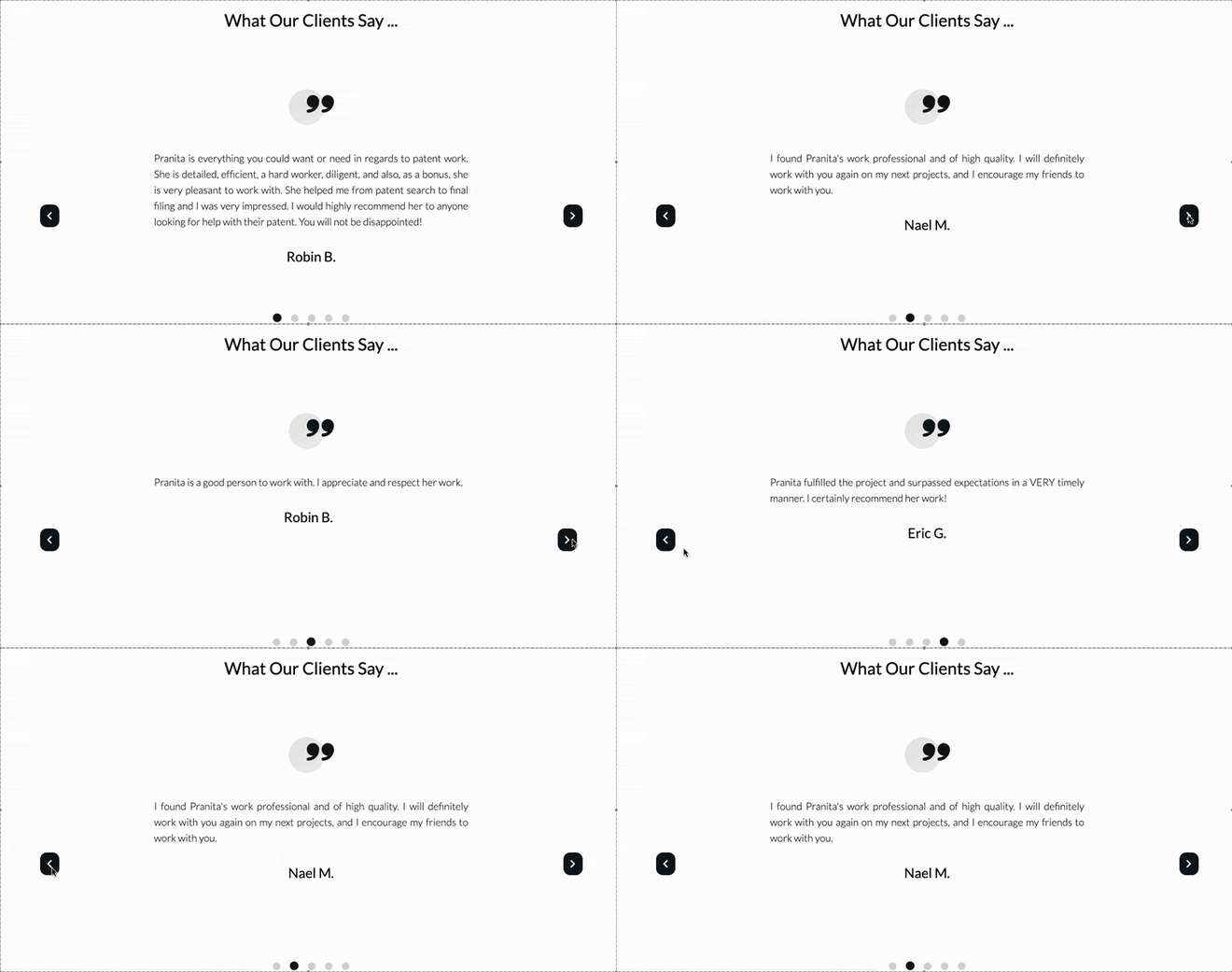
JS that remained was for dynamic typing and testimonial carousel, both of the homepage, and a cute testimonials animation of the testimonial page. Everything else was stripped away, and I used TailWindCSS for other “showy” effects.

Client Admin #
Confidentiality prohibits the two dashboards from being shown and compared pictorially.
The rewrite of the client admin was more involved than the landing pages. The previous dashboard was functional and had required features, but was clunky and unnatural. Unrelated actions were incorrectly grouped together. For example, adding new projects was grouped with creating invoices. There were some CSS issues too, where rendered elements were either too small or large without the option to resize. Also, the dashboard was not “dashboard-y”; it lacked at-a-glance statistics or plots to highlight key performance indicators (KPI) like open projects with approaching deadlines, generated revenue, completed projects that need invoicing, etc.
The obvious CSS issues were fixed in the rewrite. Functional items were added to the dashboard as well, which was now divided into two columns. The first column included KPI tracking plots for revenue per month, revenue per project type, and year-over-year revenue, where the first two plots had a year dropdown to cycle through all years. The second column included project-related information to show projects that are due soon, ongoing projects, and projects that are completed and require invoicing.
Whereas the first iteration had a simple nav bar, the refreshed nav grouped related items, creating a natural flow. The previous implementation used JS to “change” content in the app div container, and was flaky at best, error-prone at worst. The new implementation used simpler Django urls and views to render HTML templates and clickable actions (usually through a tags). This simplified frontend-backend interactions and helped scale the backend to include newer features using Django’s CRUD model.
Projects #
Project management is a large part of Innocelf’s workflow. Multiple projects may be in progress at any given time and assigned to different individuals/contractors. Projects also have payments, and a large project may have multiple milestone-based payments. Projects may have different states: assigned, in-progress, completed not invoiced, completed and invoiced, and paid. The dashboard was rewritten to make these tasks easier and, in turn, simplify the codebase for adding features in the future.
A single projects.html template file rendered projects in different states using a single url. The associated view used the status URL parameter to filter projects using Django’s in-built filtering mechanism. It created a consistent view of projects regardless of their state because it used the same template file. Searching logic was also written once and worked for all projects using the query parameter in a POST request.
# views.py
def projects(request: HttpRequest, status: str) -> HttpResponse:
    query = request.GET.get("query") if "query" in request.GET else ""

    if request.method == "POST":
        search_term = request.POST.get("query")
        query = search_term

    is_asc = False
    context = get_projects(request, status, is_asc, query)
    return render(request, "ca/projects.html", context)


# urls.py
path("projects/<str:status>", projects, name="projects")
Project actions were separate views and urls that were triggered using action buttons (a tags with appropriate hrefs) associated with each project. A single url was used for each action but with a different project uuid to help retrieve the relevant entry from the database and update it. Compare this simplicity with the previous JS implementation. The complexity of managing separate csrf_tokens for POST requests, sending that with the relevant payload using XMLHttpRequest, and changing element CSS to show updates was palpable. The code was verbose and coupled with a class (not shown in the snippet below).
markProjectCompleteOrInvoiceSent(link) {
    let csrftoken = document.getElementsByName('csrfmiddlewaretoken')[0]
        .value;
    let packetToBeSent = {
        _elementId: this.result.id,
    };

    let xhttp = new XMLHttpRequest();
    xhttp.onload = (data) => {
        if (xhttp.responseText === 'Success') {
            if (link === 'mark-prj-comp') {
                this.markProjectCompleteButton.classList.replace(
                    'text-gray-500',
                    'text-green-500'
                );
            }

            if (link === 'mark-inv-sent') {
                this.markInvoiceSentButton.classList.replace(
                    'text-gray-500',
                    'text-pink-600'
                );
            }
        }
    };
    xhttp.open('POST', '/ca/' + link);
    xhttp.setRequestHeader('X-CSRFToken', csrftoken);
    xhttp.setRequestHeader(
        'Content-Type',
        'application/json; charset=UTF-8'
    );
    xhttp.send(JSON.stringify(packetToBeSent));
}
Patent Search Reports #
Innocelf offers patentability search as one of its services. These searches are unique to an invention and require years of experience to perform correctly. The reports, although templated, took a considerable amount of time to draft (40% of the total project time, i.e., a non-trivial amount). I wanted to reduce this drafting time, potentially eliminate it, via automation.
After working on it for a month, I was able to cut drafting time by half. This functionality was added to the dashboard for employees/contractors to use. With a few inputs for patent identifiers, and choosing patents to be displayed, a Generate button click would download the generated report within seconds. Beyond efficiency, the feature made reports consistent and easy to review before delivery, maintaining the high quality of deliverables that Innocelf’s clientele are used to.
Database backups #
During the initial development two years ago, I was ignorant of backups. Loss of client information or project history was not on my mind as I was learning new languages, frameworks and creating a usable product. The system-level thinking during the rewrite forced me to take a step back and realize how bad this loss of valuable data would be. I, therefore, created a database backup strategy that used pg_dump to create a local .sql file and rclone to push it to an S3 bucket. With the current growth of the company, this process runs every day using a cron job.
pg_dump --no-password -U pm -d inno > /home/pm/innocelf_pgdump.sql
rclone sync /home/pm/innocelf_pgdump.sql InnoBDB:inno-db
-
I used
findto calculate lines of code in JS files:
find . -type f -name '*.js' -exec cat {} \; | wc -l↩︎